
The Best GEO WordPress Plugin in 2026: AigeoRadar Connector Explained Simply
If you run a WordPress site, you already know about SEO: titles, sitemaps, Google Search Console. That world still matters.
There is a second world now: AI answers. People ask ChatGPT, Claude, Perplexity, and Google’s AI features for recommendations. Those systems do not “read” your homepage the way a human does. They look for clear, machine-readable signals.
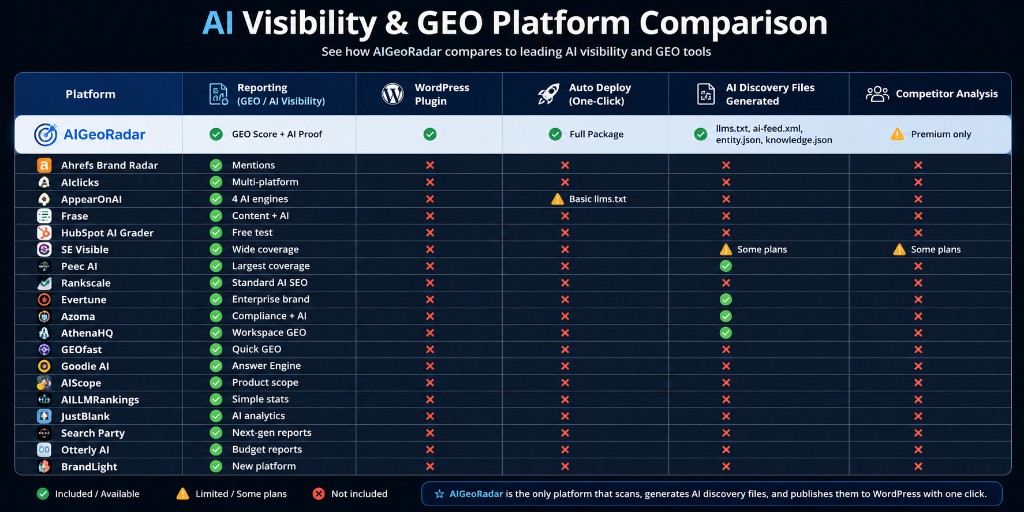
GEO means Generative Engine Optimization — helping AI systems find and trust your business facts. The AigeoRadar Connector is the WordPress plugin built for that job. In practice, there is no other WordPress plugin that runs this full GEO loop the way Connector does: scan → package → one-click deploy → per-page AI manifests → crawler access checks.
This article explains it like you have never heard of llms.txt before.
The simple problem (in one minute)
Your WordPress site is mostly HTML for humans: menus, images, marketing copy. AI crawlers prefer short, structured files they can trust:
llms.txt— a site guide written for language modelsentity.json— who you are (company, products, contact)ai-feed.xml— what you offer / what changedknowledge.json— FAQs and facts in a clean format{page}.ai.json— a per-page summary (called an AI Page Manifest, or AIPM)
Without those files, AI systems guess from messy HTML. Guessing is how wrong prices, wrong services, and missing brands appear in answers.
Creating those files by hand is slow. Editing robots.txt and theme headers by hand is easy to break. That is why the plugin exists.
What is the AigeoRadar Connector?
AigeoRadar Connector is our official WordPress plugin. You install a ZIP from your AigeoRadar account, paste a one-time connect token, and deploy the AI Discovery Package your site generated in AigeoRadar — without FTP and without hunting through theme files.
Setup guide (step by step): aigeoradar.com/help/wordpress-plugin-setup
Changelog: plugin changelog
Why we call it the best GEO WordPress plugin
We are not talking about “another SEO checklist plugin.” SEO plugins optimize for classic search. Connector is built for AI discovery.
Here is what makes it different in the real world:
- Full discovery package, not one file. It deploys
llms.txt,entity.json,ai-feed.xml,knowledge.json, and organization schema — together. - Homepage head signals for AI. It injects discovery links so crawlers are told where to read next.
- Per-page AIPM sidecars. Published posts and pages can expose a virtual
.ai.jsonnext to the human URL — the open AI Page Manifest (AIPM) format we maintain. - AI Crawler Access card. Inside WordPress you can see whether priority bots (GPTBot, ClaudeBot, Perplexity, Google-Extended, and more) are allowed or blocked in
robots.txt— with copy-ready fix suggestions. - Connected to a real GEO platform. The plugin is not a lonely ZIP. It syncs with AigeoRadar analysis, packages, and subscription status.
Other tools may generate a single llms.txt snippet. That is a start. Connector is the end-to-end WordPress GEO path: understand the site → publish machine files → keep page manifests → check crawler doors.
Open standards on GitHub (not locked in a black box)
GEO should not be a secret format. The pieces Connector uses are documented and open:
- AI Page Manifest (AIPM) — open spec + schema:
github.com/aagedik/aigeoradar-aipm
Live hub: aigeoradar.com/specifications/aipm - AI Crawler Registry (ACR) — documented crawler identities for robots policy:
github.com/aagedik/aigeoradar-acr
Live export: aigeoradar.com/ai-crawlers.json
You can read the specs, validate JSON, and see how production AigeoRadar pages publish .ai.json sidecars. The plugin implements those standards on WordPress.
How it works — five plain steps
- Scan your site on aigeoradar.com (start free if you want a preview).
- Generate the AI Discovery Package inside AigeoRadar after crawl/analysis.
- Download the Connector ZIP from your site → Integrations → WordPress.
- Install & activate in WordPress: Plugins → Add New → Upload.
- Paste the connect token and click deploy. Your discovery files go live on the site root.
That is the whole loop. No theme surgery. No “paste this into header.php and hope.”
What you get after deploy (checklist)
https://yoursite.com/llms.txtopens/entity.json,/ai-feed.xml,/knowledge.jsonopen- Homepage points AI systems to those files
- Posts/pages can serve
{path}.ai.jsonAIPM sidecars - Settings → AigeoRadar shows connection, deploy, and crawler access status
If something 404s, re-deploy from AigeoRadar after updating the plugin (especially after Connector 0.2.4 head-tag cleanup). Details are in the changelog.
GEO vs SEO — do you still need both?
Yes. Keep Rank Math / Yoast / your SEO stack for Google classic search. Add Connector for the AI layer. They solve different problems:
- SEO plugins: titles, sitemaps, redirects, on-page SEO for search engines.
- AigeoRadar Connector: machine discovery files, AIPM manifests, AI crawler policy visibility, sync with a GEO platform.
Using only an SEO plugin leaves AI systems with HTML soup. Using only a random llms.txt paste leaves you without entity graph, feed, per-page manifests, and crawler checks.
Who this is for
- WordPress site owners who want to appear in AI answers, not only in blue links
- Agencies managing client GEO without custom engineering on every site
- Founders who want facts (pricing, services, niche) stated in files AI can quote
Starter plan and above include WordPress plugin sync (one WordPress site on Starter). See pricing on aigeoradar.com/pricing.
FAQ
Is this a free WordPress.org plugin?
Connector is distributed from your AigeoRadar dashboard as a ZIP and connects to your AigeoRadar site. Install is standard WordPress upload — the intelligence and package live in the platform.
Will it slow my site down?
Discovery files are lightweight text/JSON/XML. AIPM sidecars are generated/served as virtual routes for published content — not heavy page builders in the admin loop.
Do I need to know JSON?
No. AigeoRadar builds the package. You click deploy. Advanced users can still read the open AIPM schema on GitHub.
What if AI bots are blocked in robots.txt?
Connector’s AI Crawler Access card flags blocked priority bots. You can also run the free AI Bot Checker against the ACR registry.
Is there a deeper WordPress GEO guide?
Yes — for file formats and 2026 context see WordPress GEO: llms.txt and AI discovery and our earlier overview of auto-generating discovery files.
Start today
If you want AI systems to stop guessing about your WordPress business, deploy the stack that was built for GEO — not bolted onto classic SEO.
- Read the setup guide: WordPress Connector setup
- Open the AIPM standard: GitHub — aigeoradar-aipm
- Scan and package your site on AigeoRadar
That is the best GEO WordPress path available today: open standards, a real platform, and a Connector that actually ships the files AI crawlers can use.
İlgili yazılar
Jul 26, 2026
Prepare Your Entire WordPress Website for AI in Just 5 Minutes
Deploy every AI Discovery file automatically with the AigeoRadar WordPress Plugin. Generate dynamic AI Page Manifest (AI...
Aug 7, 2026
WordPress GEO: llms.txt, llms-full.txt, and AI discovery in 2026
How to make your WordPress site discoverable by ChatGPT and Perplexity — with AigeoRadar one-click deploy.
Aug 7, 2026
Check 241 AI Bots Against Your robots.txt — Free AI Bot Checker
See which AI and search crawlers your robots.txt allows or blocks. Free policy check powered by the ACR registry of 241...